Skip to content
  • babehsugi @ aipa66 slot089 emaslot88 markaswede patcai99 betton999 otpindo Professionals
  • Agencies
  • asg555 @ skyidn ltdtoto999 6789rp hoki55 kerbo28 majong50 Join Wanacare
  • Our business
    • utimaslot @ ck788 mudawd.net v21 login legoboss papi66 max47 Our offerings
    • y55 @ roket51 kenari66 777lucky dapursanjung spn89 planet120 post4d Safety
    • sampurna178 @ km678 nagahoky bunda138 serokboss flb999 owner34 jos34 Privacy Policy
  • qezjp @ murajitu t9999 gacorways sukabet87 facaytoto pwe128 Help
  • Español
  • babehsugi @ aipa66 slot089 emaslot88 markaswede patcai99 betton999 otpindo Professionals
  • Agencies
  • asg555 @ skyidn ltdtoto999 6789rp hoki55 kerbo28 majong50 Join Wanacare
  • Our business
    • utimaslot @ ck788 mudawd.net v21 login legoboss papi66 max47 Our offerings
    • y55 @ roket51 kenari66 777lucky dapursanjung spn89 planet120 post4d Safety
    • sampurna178 @ km678 nagahoky bunda138 serokboss flb999 owner34 jos34 Privacy Policy
  • qezjp @ murajitu t9999 gacorways sukabet87 facaytoto pwe128 Help
  • Español

How to create an account and request a service

by General

How to register as a client and request a service

How to register as a client and request a service

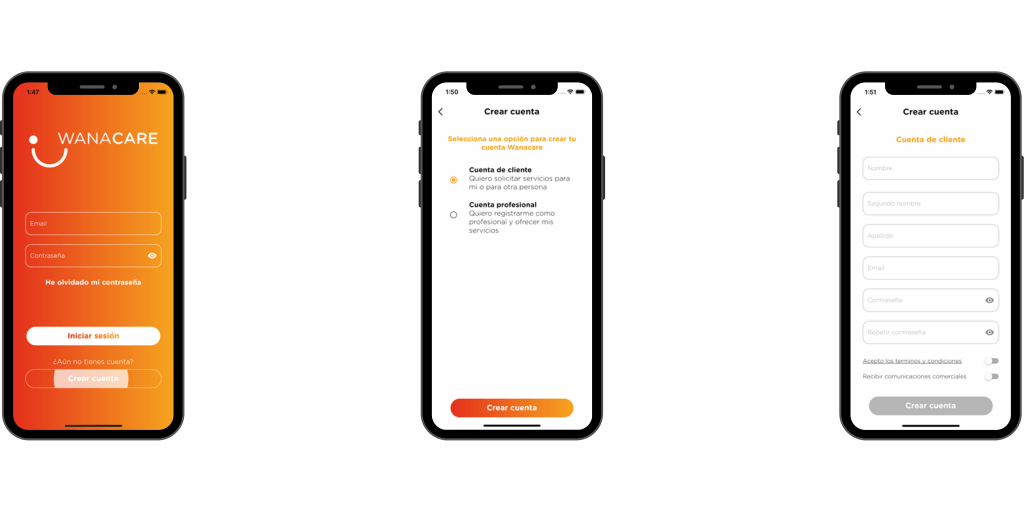
  • Download the app on Apple Store or Play Store

  • Click the “Create Account” button.

  • Choose the option “Customer account”

  • Fill in the form, accept the terms and conditions and press “Create account”.

  • Once the account is created, log in with your credentials.

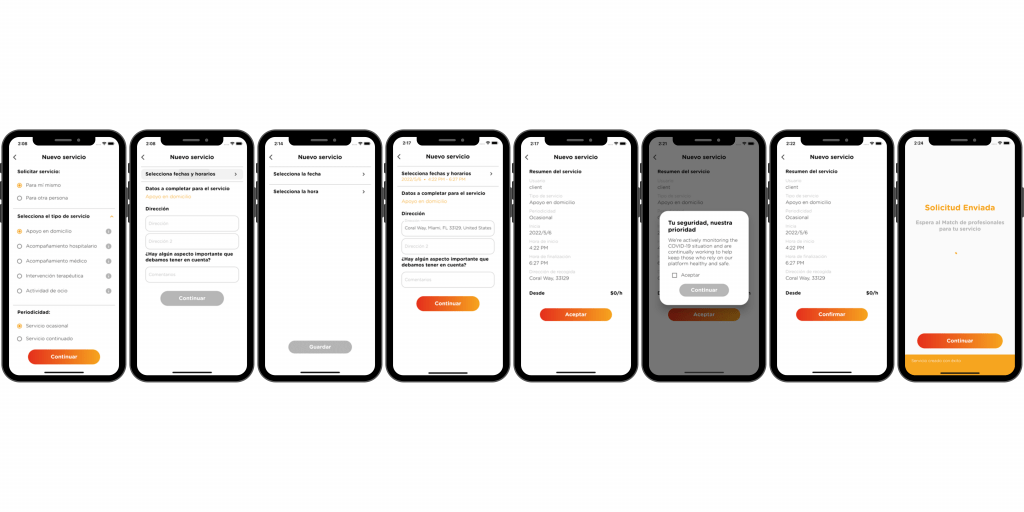
Now, you can request a service by pressing the central “+” button:

  • Choose who the service is for: for you or for someone else. If it’s for someone else, choose the user or add a new user.

  • Select the type of service you need.

  • Indicates whether it is a one-off service (for one day) or a continuous service (a service that is repeated over several days.

  • Select the date and time of the service or services.

  • Indicates the address of the service.

  • Next, you will see the summary of the service you have requested. If the information is correct, click “OK”. If you want to correct any data, go back to the previous screens and make the necessary changes.

  • You will receive a notification when there are professionals interested in your service.
Go to:

  • How to register
  • How to login
  • How to complete profile
  • How to add users
  • How to request a service
  • How to see my services
  • How to see available professionals
  • How to choose a profesional
  • How to value a professional
  • How payments are made
  • How to see my invoices
  • How to cancel a service
  • How to remove a professional from the service
Categories Profile and account
How to see my payments​
How to create an account and apply to work​

LA PLATAFORMA DIGITAL DEL HOME CARE Y HOME HEALTH CARE

COMIENZA AHORA
PRODUCTO
Profesionales
Empresas
Seguridad
CONÓCENOS
Blog
Términos y condiciones
ZONAS
Key Biscayne
Brickell Home Care
Aventura Home Care
Coral Gables Home Care
+ZONAS
Miami Lakes Home Care
Bal Harbour Home Care
Doral Home Care
Key Biscayne Home Care
GIG ECONOMY
¿Qué es la economía GIG?
Facebook Youtube Instagram